Wavesteam
HomeAll case studiesBook a consultation

CASE STUDY · K12 LEARNING APP

K12 Learning App Case Study: One Loop for Dictation, AI Writing, and Phonics

We built and launched a K12 learning app for an edtech product team—parent/student accounts, textbook units, dictation tasks, dot-matrix pen writing, AI essay review, phonics assessment, and points on one learning data stack. The hard part was never any single feature; it was making every scenario share one identity, task, result, and operations model—not stacking features, but making a learning product that actually runs.

K12 Learning AppPC Admin ConsoleDot-Matrix PenAI Essay ReviewPhonics AssessmentStudy Points
Share your product ideaSee the three core loops
Dictation → Writing → Phonics
apple
ant

Phonics set

8.5 / 10
Today’s learning tasks

Background

The client needed a complete family-learning app—not a set of isolated features

The product had to cover unit dictation, pen writing, error retry, AI essay review, picture-book sharing, phonics assessment, points and streaks, plus admin-side word lists, tasks, and rules. None of that is hard alone—but they cannot each carry their own accounts, tasks, and data.

Account model
Parent
Student AActive
Student B

01 / Identity

Parents, students, and multiple profiles must share one account system

Whose dictation record is this? Who owns the essay? Where do points post? What does a parent see after switching students? One identity model has to answer that—not a different hack in every module.

Without clear ownership, no learning result can be trusted downstream.

Dictation task
G3 · Term 2 · U4
词
19
appleantbook

19 errors

02 / Tasks

Dictation is not a page—it is a full learning task

Textbook unit → word list → audio → writing → submit → result → errors → retry. Only when those states connect does dictation become operable by unit, not a one-off demo.

Tasks stay linked so content can update by unit over time.

AI output model
Chat reply…
…
Structured review

03 / Results

AI review cannot stop at a one-time chat reply

Results need save, search, share, rework, picture-book generation, and a work library. We structured AI output and folded it into one work model so each essay submission keeps living in the product.

AI is a step in the work pipeline—not a standalone feature.

Points engine
8.5Rule #3

04 / Incentives

Points rules must be operable—not hard-coded

Phonics, writing, streaks, and other behaviors all earn points. Rules locked in code mean every tweak needs a release—so configuration and maintenance sit in the admin console.

Incentives can evolve after launch; the product stays operable.

The first problem to solve was how every learning capability shares one product data chain.

Core architecture

Organize the app by learning loops—not by feature pile-up

The project uses five business layers: identity → tasks → results → incentives → governance. The app owns learning experience; the admin console owns content and operations—the key architectural decision behind the whole build.

Feature pile-up
Dictation as its own silo
Grading as a chat widget
Phonics built separately
Separate accounts and data
Points hard-coded

Feature pile-up

Dictation as its own silo → Grading as a chat widget → Phonics built separately → Separate accounts and data → Points hard-coded

Five-layer structure
Identity: parent / student / profilesTasks: grade / term / unit / assignmentsResults: errors / essays / review / reportsIncentives: points / streaks / feedbackGovernance: lists / rules / feedback / export

Five-layer structure

Establish one data chain first, then add learning capabilities—three different scenarios, one shared structure underneath.

Core loops

Three learning loops on one data structure

Dictation, writing, and phonics look like different products—but all sit in one task system. Pen strokes, AI review output, and phonics reports become data the rest of the product can keep using.

Dictation engine
词
Pen OK19 saved

01 Dictation: from pen strokes to error retry

Pick unit → load words → play audio → write with pen → submit strokes → dictation result → log errors → retry. Strokes tie to student, task, word, and outcome—not an orphan file upload.

Student → task → unit → word → stroke → result → errors—a dictation loop you can run by unit.

Review pipeline
DraftAIBookShare

02 Writing: from AI reply to durable work assets

Pick prompt → write → AI review → structured result → work library → share → picture book → preview and share. Score, strengths, suggestions, and original text persist together—searchable and shareable.

Each submission continues into work management, sharing, and books—not a disposable chat.

Phonics + points

8.5

+12

03 Phonics: from recording to report and points

Pick exercise → record → speech assessment → grouped scores → learning report → points calc → ledger entry. Learners get full feedback; point rules leave business code and become admin-configurable.

Phonics feeds one points ledger—reward rules maintained by operations.

Account layer
StudentActive
userId: st_042

04 App + admin: learning experience and ongoing ops

The app carries home, dictation, writing, phonics, works, reports, and points; the admin console handles word lists, grade units, task templates, review results, point rules, feedback, and export.

Learning app ↔ services ↔ PC admin—a full product from practice to operations.

Coexisting loops

Three scenarios, one underlying structure

Dictation, writing, and phonics differ in task type, outcomes, and next steps—but all resolve to student identity → learning task → result → incentive → governance.

Dictation loop
Unit task
→
Error retry

Dictation

Unit dictation task → strokes / correctness / errors → error retry. Pen data enters the task system; errors link to student and unit for ongoing practice.

Writing loop
Pen SDK
+
Unit API
Work assets

Writing

Writing task → essay / AI review → works / picture books / sharing. Structured review persists and continues in the work library.

Writing chain
AILinkBook

Phonics

Phonics exercise → recording / score / report → points / learning feedback. Assessment and report ship together and post to one points ledger.

Phonics loop
if (type==='phonics') +5
Points post

Shared base

Identity → task → result → incentive → governance—the foundation that lets three loops coexist and new capabilities extend after launch.

Product experience

The app learns; the admin console keeps it running

After launch, what changes is not just app screens—content, tasks, rules, and feedback keep moving. These views show how the learner side aggregates tasks and how results feed operations.

App ↔ Admin
AppLearning App
Unit dictation
Smart writing
Phonics report
  • 01Unit dictation
  • 02Smart writing
  • 03Phonics report
  • 04Points posted
Services
Results ↑Rules ↓
PCPC Admin
Word lists
Task assign
  • Word listsEdit
  • Task assignAssign
  • Point rulesConfig
  • User feedbackReply

The app learns; the admin console keeps it running

Content and rules live in admin; learning closes in the app—the product stays operable after go-live.

Today’s tasks home

Home: task entry and practice overview

Dictation, writing, and phonics entry points with pending tasks and progress—one task framework for reach.

Smart writing

Smart writing: prompts, review, and work library

After AI review, structured results land in the work library for sharing and picture-book flows.

Assign learning tasks

Task assign: student profile and textbook unit

Tasks bind to student profile and grade/term/unit; admin configures templates, app shows pending work.

Dictation error words

Dictation submit: strokes, errors, retry queue

Unit filter → pen write → submit comment → errors enter retry queue with full data trail.

Phonics report

Phonics report: assessment feedback and points

Practice volume, averages, grouped comments; reports and points post to the ledger by rule.

Implementation

Tech stack for one integrated learning chain

Clients deliver learning UX; core services unify accounts, tasks, dictation, works, and points; external capabilities connect pen SDK, AI review, and speech assessment—supporting three loops on one data model.

Architecture

iOS / Android learning app + PC admin + pen SDK + AI essay review + speech assessment

Clients

iOS / Android app (home / dictation / writing / phonics / works / points) · PC admin (content / tasks / feedback / rules / export)

Clients
DictateWritePhonics
App
Content
Tasks
Rules
Admin

Core services

Unified accounts & student profiles · Learning task system (grade / term / unit) · Dictation (lists / strokes / errors) · Works (review / share / picture books) · Points (rules / ledger / reconciliation)

Core services
1Accounts
2Tasks
3Dictation
4Works
5Points

External capabilities

Pen SDK (stroke capture tied to tasks) · AI essay review (structured output) · Speech assessment (phonics analysis & grouped scores)

External APIs
API
Pen SDK
AI
AI review
Speech

Data

Errors / works / review / phonics reports · Points ledger & ops export

Data layer
Errors128
Works56
Reports34
Points892
Export

Keywords

K12 learning app developmentcustom edtech product developmentdot-matrix pen integrationAI essay review systemphonics assessmentstudy points system developmentPC admin console development

Outcomes

What shipped was not just features—it was a learning data loop

From scattered modules to one operable learning app—these delivery outcomes show how the product runs in production and keeps room to operate after launch.

Unified accounts
Parent
Student A
Student B
DictationWritingPhonics

Unified accounts

All modules share student identity and data ownership—parent/student roles and multi-student households supported.

Dictation loop
1
Unit
2
Pen
3
Errors
4
Retry
错词复

Dictation closed loop

Units, word lists, audio, pen, dictation results, and error retry form one chain—operable by unit over time.

AI persists
Essay→AI→Library→Book
AI …
…
85
Book

AI that persists

Essay review lands in the work library for sharing and picture books—not a one-off AI reply.

Ops ready
PhonicsWritingStreak
积分流水+12
Phonics+4
Writing+3
Streak+2
Rule #3管理端

Incentives & admin ops

Phonics, writing, streaks, and more post to one points ledger; rules and content maintained in admin without app releases.

Reusable pattern

When tasks, AI, and hardware meet, data structure matters more than feature count

This pattern fits edtech products that need student profiles + learning tasks + AI / hardware + results + incentives—establish the data chain first, then add capabilities.

K12 workbook apps

Unit-based practice, error books, reports, parent views

K12 workbook app
U1
U2
U3
U4
G3 · U4错词 12
Weekly
IdentityTasksResultsPoints

AI homework / AI grading

Structured review, work sharing, admin search and reply

AI grading product
作文…
88
ShareSearch
IdentityTasksResultsPoints

Smart-pen learning

Stroke submit, page validation, tasks linked to errors

Smart-pen homework
P.12
PenSynced
IdentityTasksResultsPoints

Language learning apps

Dictation / phonics / recording assessment + points

Language learning
8.6
Phonics
+8
IdentityTasksResultsPoints

Training org platforms

Student profiles, task assign, work showcase, back-office ops

Training platform
123
3
5 due
5 due
5 due
Admin
IdentityTasksResultsPoints

Talk about your product

Ship one learning loop first—not a pile of features

Planning a K12 app, AI homework product, smart-hardware learning system, or family-education product? What to decide first is usually not which screen to build—it is who learns, what they learn, how tasks form, where results live, what happens next, and how ops keeps running. We can start from your core scenario, shape an MVP, then set boundaries for accounts, tasks, data, and AI / hardware.

  • Who learns · WhatAccount model, profiles, curriculum structure
  • Tasks · Results · NextHow the main loop connects and where data lands
  • Ops · ExtensionAdmin config, AI and hardware rollout pace

One main loop first—then extend with more learning capabilities.

Share your product ideaView more case studies

Related cases

More case studies

Other projects delivered by Wavesteam — AI, IoT, platform builds and enterprise software.

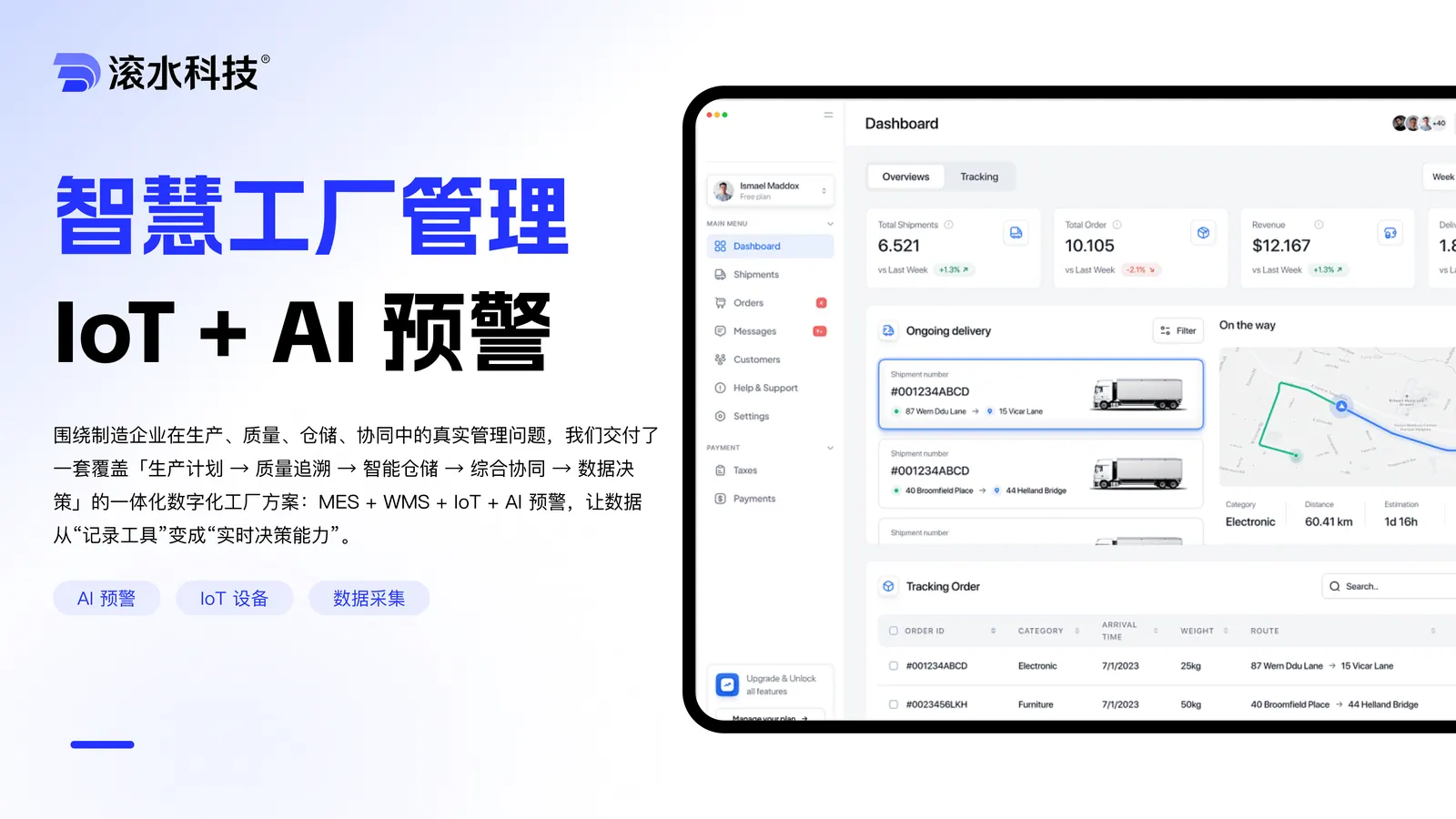
  • Smart Factory Management

    Smart Factory Management

    A factory operations platform that unifies system collaboration, production workflow and shop-floor visualization for manufacturing teams.

    Read the case study→
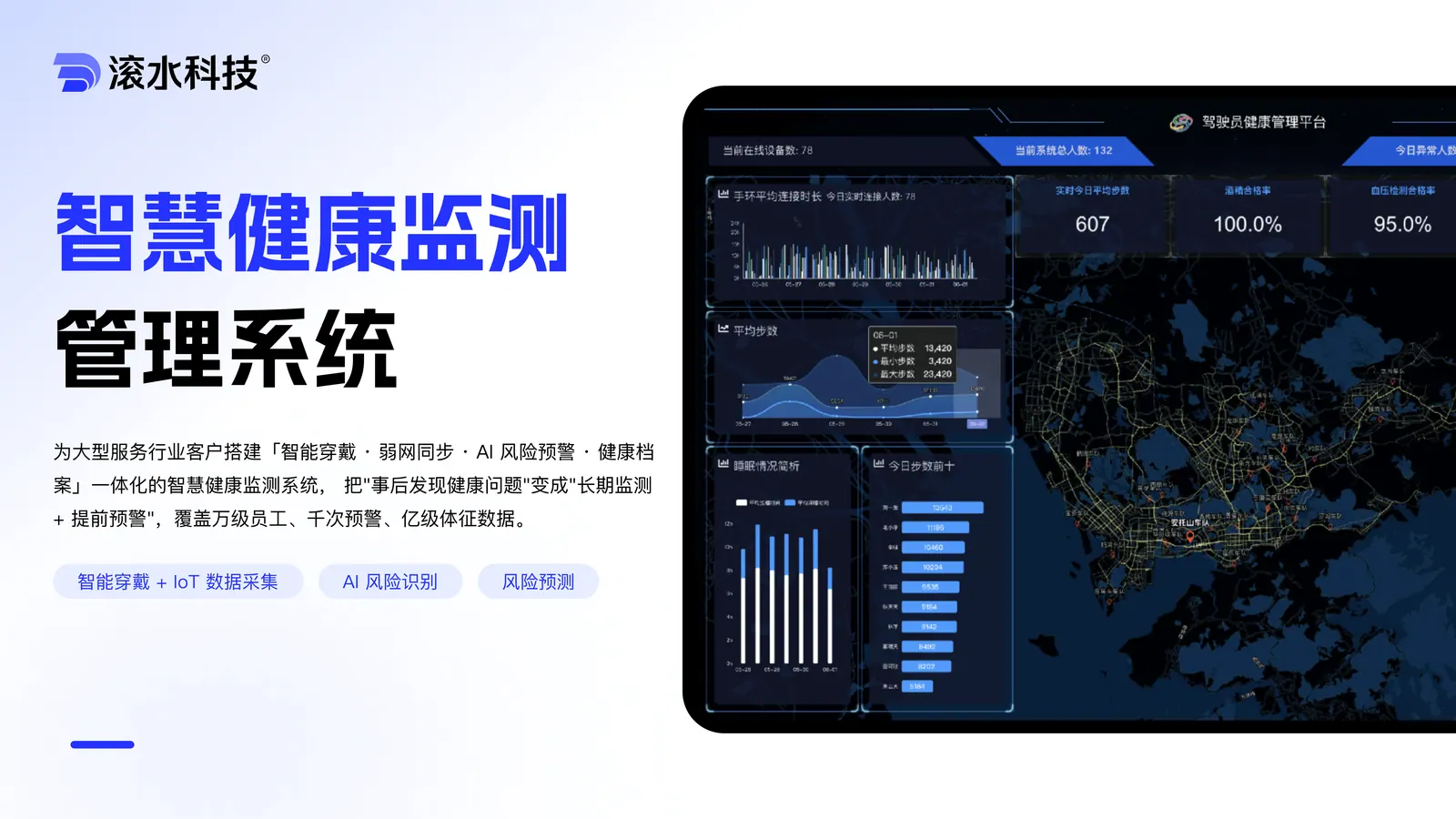
  • Worker Health Monitoring & Risk Warning

    Worker Health Monitoring & Risk Warning

    An occupational health monitoring system with early-warning analytics and control-room dashboards for industrial safety teams.

    Read the case study→
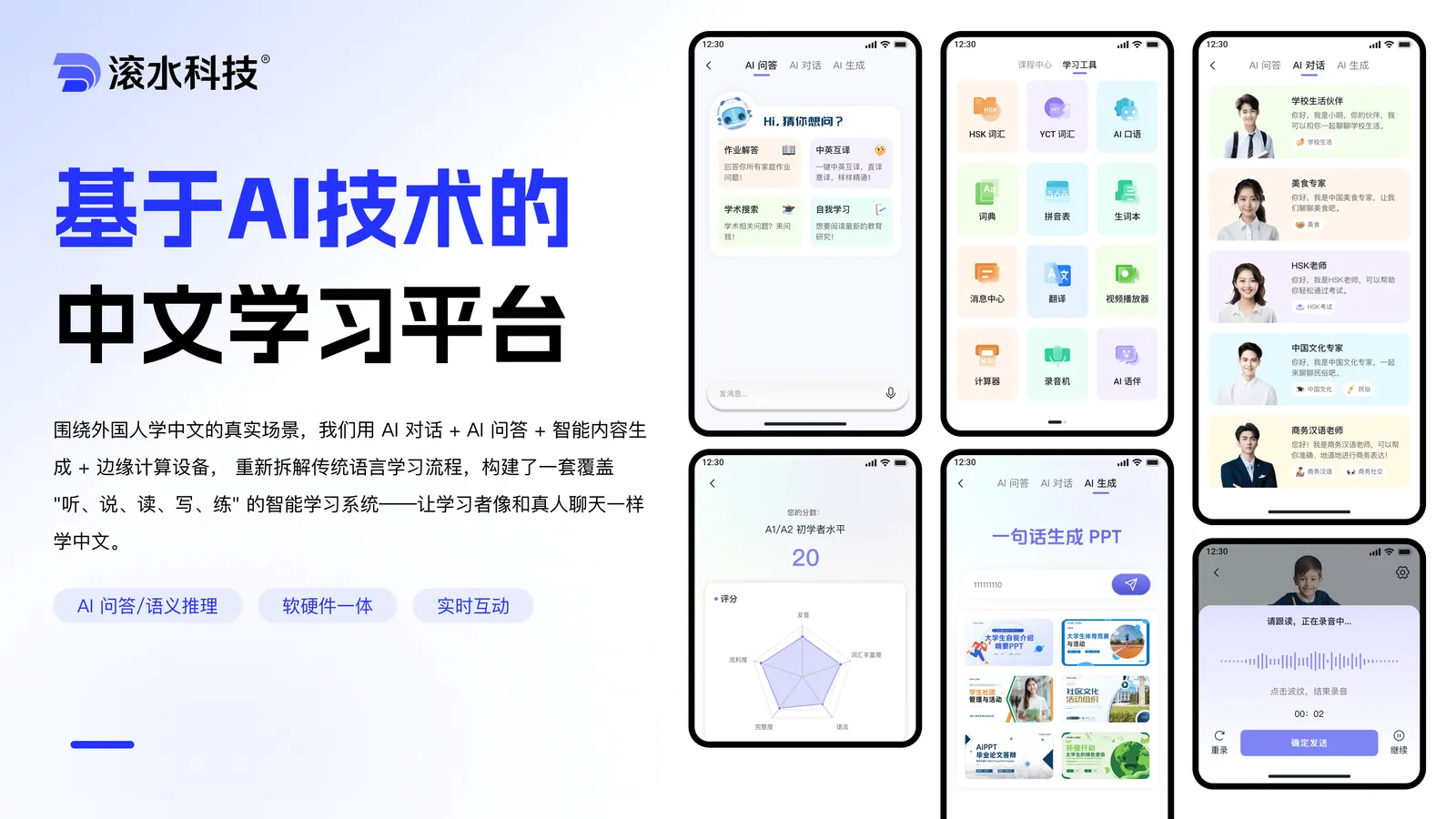
  • AI Chinese Learning System

    AI Chinese Learning System

    A real-time AI conversation system for learners of Mandarin Chinese — combines LLM dialogue, smart content generation and edge inference hardware.

    Read the case study→
Engineering Delivery

Bring us a concreteengineering problem, and we’ll start with the systems, data, interfaces, and delivery constraints that shape the answer.

These projects usually involve business systems, device integration, AI workflows or multi-role back-offices. We assess feasibility against real delivery constraints and give recommendations close to the implementation stage.

Business email
contact@wavesteam.com
Office
10F, South Tower, Kingkey Yujing Times, Longgang District, Shenzhen

By submitting, you agree we'll use your information only for this consultation — never for unrelated marketing.

Wavesteam

Wavesteam ships production-grade AI software for B2B teams — mini programs, business systems, AI workflows, industry platforms and long-term engineering support.

Contact
© 2026 Wavesteam Technology. All rights reserved.
Email:contact@wavesteam.comOffice:10F, South Tower, Kingkey Yujing Times, Longgang District, Shenzhen