Wavesteam
HomeCasesSolutionsKnowledge & InsightsAbout
中EN
Wavesteam

Project register

Package snapshot

Package agreements

Image revisions

Image revisions

Delivery scheduling

Photography Post-production Management

Keep package agreements, image-level revision requests and delivery schedules connected across your studio team.

Try the interactive demoIndustry report (Chinese)
  • 01

    Package agreements

    Keep the original scope available for every handoff.

  • 02

    Image tasks

    Locate each revision by its image reference.

  • 03

    Revision feedback

    Keep client requests connected to the work.

  • 04

    Delivery planning

    Identify the next owner and remaining work.

Keep the brief intact when work changes hands

Keep the project agreement, image feedback and next handoff connected across the team.

Keep feedback connectedRetain the agreed scopeMake the next step clear

Keep the brief intact

A small studio may manage a few projects through familiar gallery and messaging tools. Once several people handle client requests and editing, each handoff needs the latest instructions and the original agreement.

Demo scenarioPJ-2603
C-0305
Revision request

More natural dress folds; less red in the skin tone.

Revision requestedImage-level approval
01Client note02Image task03Revision status

Check the original agreement

A request left in a chat can miss the retoucher. An unclear package change can reopen a pricing discussion. A project marked simply “not delivered” does not explain whether the team is waiting for the client or still editing an image.

Operating model
Project agreement

Package snapshot

Included retouchesProject-specific
Extra-image rateProject-specific
Fee confirmationProject-specific
New requestReview agreementApprove change

Know what happens next

This solution focuses on studios with defined retouching packages, image-level revisions and regular handoffs between roles.

Workflow illustration
01Awaiting client
02Retouching
03Awaiting feedback
Delivery planningAssign the next handoff

From request to action

One revision, with the context to act on it

A client asks for a more natural dress fold and less redness in the skin. The retoucher needs the image reference, the previous brief and the current approval status.

In sample project PJ-2603, image C-0305 carries the client note and revision feedback alongside the other image tasks. The team can distinguish the outstanding revision from images already confirmed.

The mechanism is practical: image references identify the work, feedback preserves the brief, and task status helps the manager plan the next handoff. Any reduction in repeated communication should be measured against the studio’s own baseline.

Try the workflowIllustrative scenario · local state only
Image task / C-0305Revision requested

More natural dress folds; less red in the skin tone.

Next actionRetoucher reviews the request

Choose an image to inspect its feedback and next action.

The operating model

Connect agreements, image tasks and delivery records

Operational questionRecord to consultDecision it supports
What did this package include?Package snapshot and fee-confirmation versionEstablish the agreed scope before adding work
Which image needs another change?Image reference, client note and revision feedbackBrief the person handling that image
What has the client already approved?Delivery version and image statusSeparate accepted work from outstanding tasks
Who needs to act next?Project stage, owner and agreed dateFollow up with the client or schedule production
Record relationships

A shared project record

01Package & fee version
02Images & revisions
03Delivery & approval
04Owner & due date

Rules that travel with the work

Retain a reference for the original scope

Package prices and included images can change over time. An active project still needs a reference to the agreement under which it was accepted.

The project detail displays a package snapshot with included retouches, additional-image pricing and a fee-confirmation version. This provides a starting point for discussing added work. Your approval rules for complimentary images, upgrades and specialist edits can be defined during scoping.

Operating model
Project agreement

Package snapshot

Included retouchesProject-specific
Extra-image rateProject-specific
Fee confirmationProject-specific
New requestReview agreementApprove change

Ready for the next handoff

Plan around the reason a project is waiting

Waiting for selections, editing images and waiting for feedback call for different actions. The project register brings stage, owner, fee confirmation and revision progress together, while the photographer workspace groups outstanding work by delivery stage.

Define how workload is counted, how assignments change and how client waiting time affects internal dates before implementing scheduling rules.

Workflow illustration
01Awaiting client
02Retouching
03Awaiting feedback
Delivery planningAssign the next handoff

A wider perspective

What an established gallery business can teach us

Product & customer practice

Pixieset

Pixel Perfect Photography

Client galleriesDigital deliveryPrint purchases
Client delivery workflow
01Share the client gallery↓
02Select and deliver photos↓
03Order finished products

Workflow illustration based on the published case.

The customer task

Pixieset serves photography delivery and client collaboration. In its public client guide, Pixel Perfect Photography explains favorites, PIN-based downloads and access to print purchases. The business mechanism extends the handover of files into a service experience where clients can choose, receive and purchase finished work. Pixel Perfect’s client guide

How the model works

Pixieset links favorite lists with image comments, keeping instructions attached to their subject. Its free entry option and subscription tiers allow photography businesses to test the gallery experience and upgrade for capacity or features. Proofing documentation, pricing

What to evaluate

For a studio evaluating software, this establishes a useful starting point: assess standard gallery capabilities first. Then check whether configuration or integrations can support your package approvals, retoucher assignments and existing business systems. The published client guide does not establish a financial return for your studio.

Choose the right approach

Choose the level of investment your workflow needs

01

Use a proven platform

02

Connect existing tools

03

Build around your rules

Your situationA sensible evaluation path
One person handles a small number of projectsTest an established gallery product first
The gallery works, but a few handoffs remain manualAssess configuration, exports or a focused extension
Multiple roles need specific approval, revision and integration rulesDefine the gaps and scope a tailored system

Compare storage, project migration, training, maintenance and future changes alongside subscription or development costs. Use one representative project to test the fit before expanding the scope.

A practical first release

Define the first release with a real project

  1. 01

    Prepare a real project

    Bring one package, an anonymized delivery history and a typical revision. Establish three acceptance questions: can the team find the agreement, attach the request to the right image and identify the remaining work?

  2. 02

    Define the first release

    Wavesteam can use these examples to define roles and rules, design the workflow, and proceed through development, testing, acceptance and launch. Client selection, notifications, payments and file delivery can be assessed as separate integration requirements.

  3. 03

    Confirm production requirements

    The demo illustrates management screens and business relationships. Production use requires account access, image storage and backup arrangements. Payments and notifications in the demo are simulated.

Planning your project

Before you commission a system

Practical decisions about tools, operating rules and investment.

Have a specific workflow to discuss?

Bring a representative project and your current rules.

Contact Wavesteam

Can we keep our current gallery?

Start by assessing project links and image references. Deeper integration depends on the gallery’s interfaces, file naming and ongoing cost.

Do we need to move every historical project?

Define which active projects and historical records need to remain accessible. Confirm which image relationships, agreements and notes can be exported from the original tools.

What happens if a client changes a selection after editing?

Agree who approves the change, which work is retained and what creates a new task or charge. Use specific examples as acceptance criteria.

Can you guarantee fewer revisions?

Establish the current reasons for rework and communication volume, then compare during a pilot. The system provides traceability; results depend on the workflow and adoption.

Explore your next step

Try the handoff with three questions

Open the studio management view and inspect PJ-2603. Find its package snapshot and fee-confirmation version, then review the feedback on C-0305. Return to the register and identify what remains to be done. Compare those answers with how your team handles the same decisions today.

Explore the demo
  1. 01

    Check the agreement

    Review the package and fee version.

  2. 02

    Open an image task

    Find the feedback for C-0305.

  3. 03

    Plan the next handoff

    Identify the owner of the remaining work.

Bring your workflow. Define the next step.

  • One package
  • An anonymized project
  • A revision example
Discuss your workflow

Related solutions

More Wavesteam solutions

AI, capital-markets docs, OCR, vision, IoT and membership operations — composable for your industry.

  • Event Ticketing & Admission Management

    Event Ticketing & Admission Management

    Manage group-ticket entitlements, entrance checks and attendance reporting around the rules of your venue.

    • Group-ticket entitlements
    • Entrance checks
    • Attendance reporting
    Explore solution→
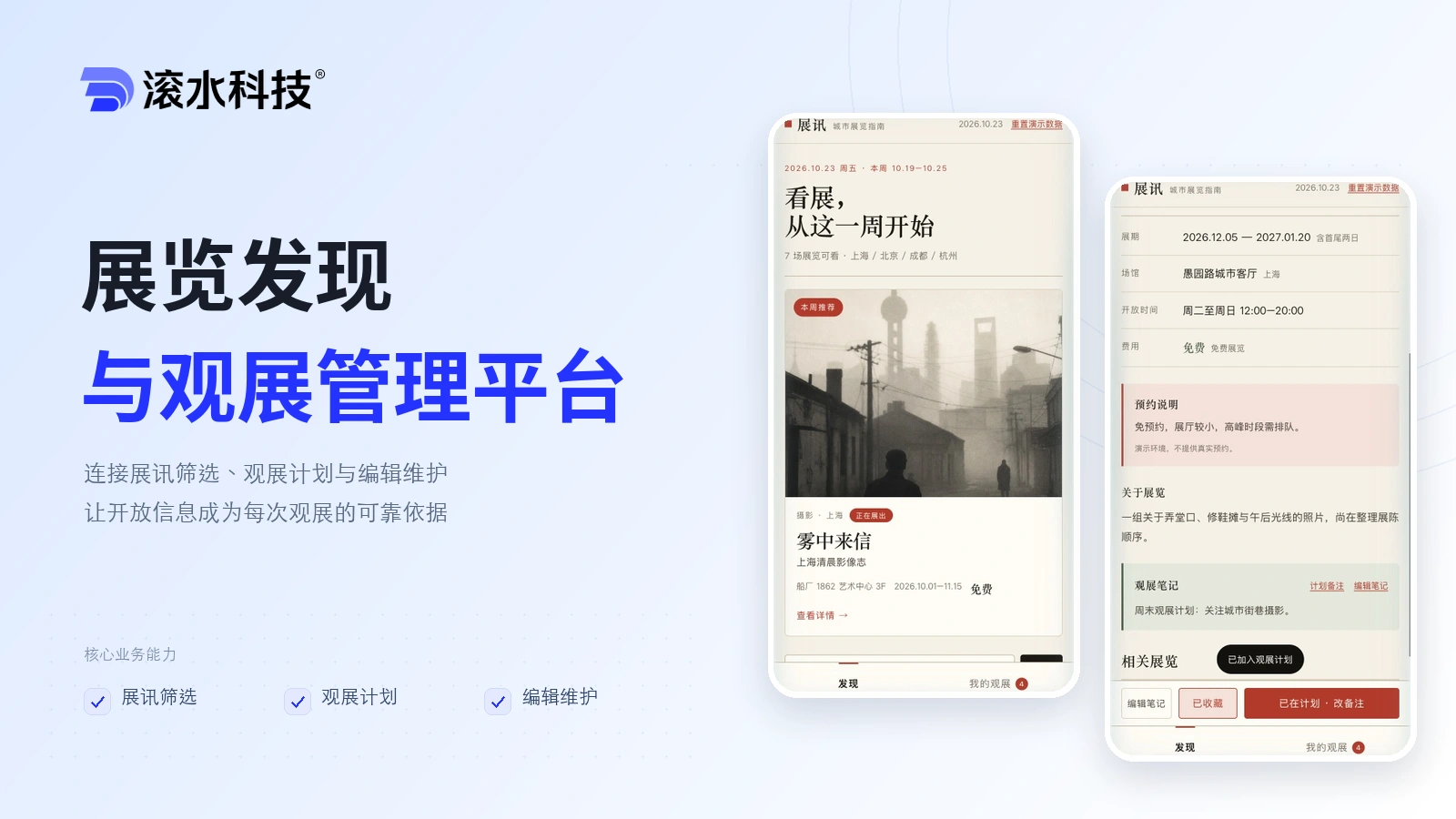
  • Exhibition Discovery & Visit Planning

    Exhibition Discovery & Visit Planning

    Connect exhibition listings, personal visit plans and editorial updates so audiences can plan a visit with the right information.

    • Exhibition discovery
    • Visit planning
    • Editorial updates
    Explore solution→
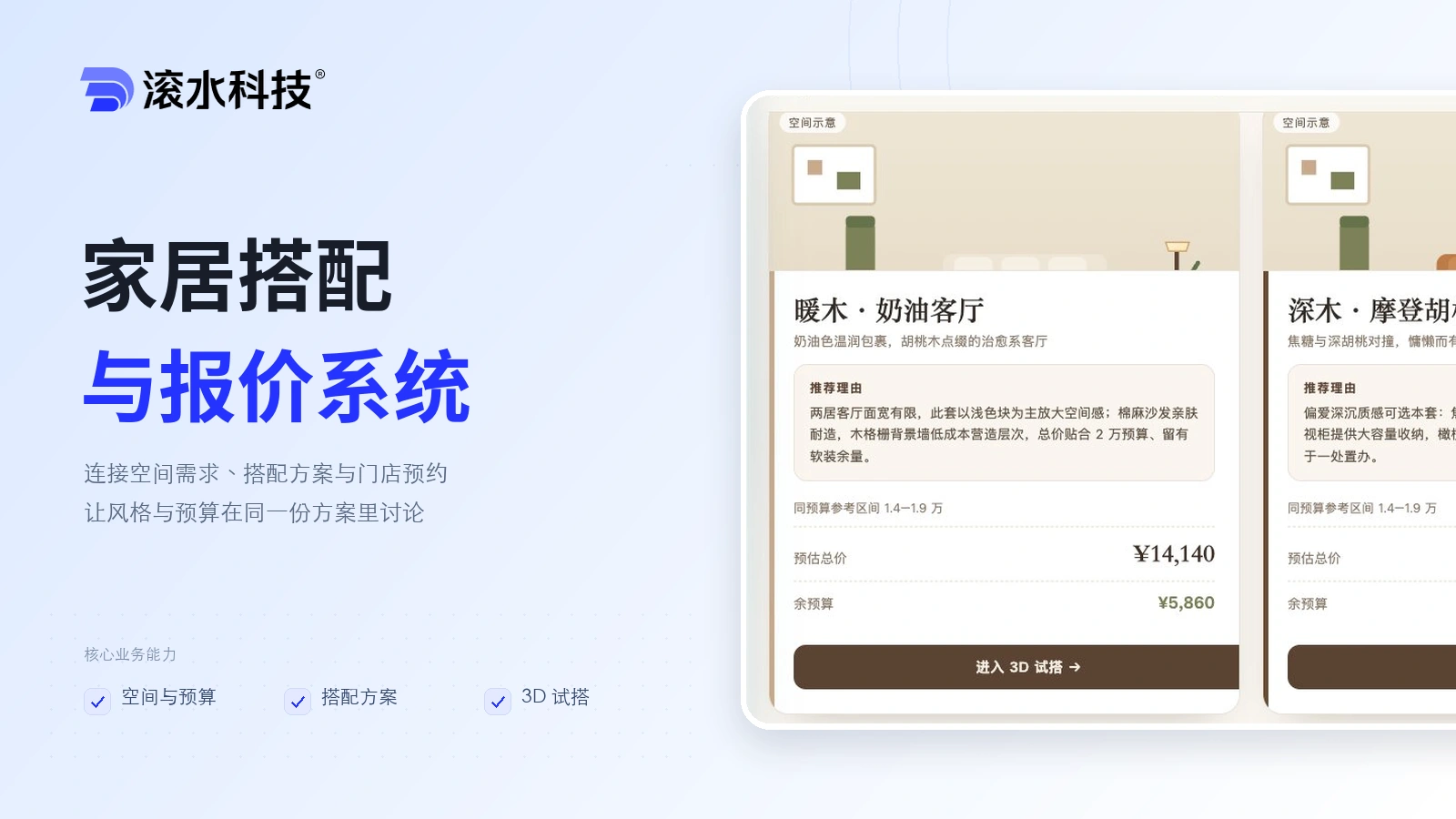
  • Furniture Configuration & Quoting

    Furniture Configuration & Quoting

    Help shoppers move from a room brief and budget to comparable furniture options, a 3D preview and a store appointment.

    • Room brief
    • Style options
    • 3D configuration
    Explore solution→
Wavesteam Technology

Keep package agreements, image-level revision requests and delivery schedules connected across your studio team.

Contact us
© 2026 Wavesteam Technology. All rights reserved.
Email:contact@wavesteam.comAddress:10F, South Block, Kingkey Royal Tower, Longgang District, Shenzhen